
1164 lines
49 KiB
Markdown
1164 lines
49 KiB
Markdown
本文介绍基于 WebSocket 协议的实时多模态交互 API。WebSocket协议延迟低、资源占用少,是首选接入方案。
|
||
|
||
WebSocket是一种支持全双工通信的网络协议。客户端和服务器通过一次握手建立持久连接,双方可以互相主动推送数据,因此在实时性和效率方面具有显著优势。
|
||
|
||
对于常用编程语言,有许多现成的WebSocket库和示例可供参考,例如:
|
||
|
||
- Go:`gorilla/websocket`
|
||
|
||
- PHP:`Ratchet`
|
||
|
||
- Node.js:`ws`
|
||
|
||
|
||
建议您先了解WebSocket的基本原理和技术细节,再参照本文进行开发。
|
||
|
||
**说明**
|
||
|
||
对于RTOS或某些旧版Linux系统,建立安全Websocket 通信所依赖的 TLS 隧道,需要做如下配置:
|
||
|
||
- TLS 版本要求 TLS1.2 或以上
|
||
|
||
- 开启 SNI(SERVER NAME INDICATION)
|
||
|
||
- 配置 CA 证书([GlobalSign Root CA - R3](https://secure.globalsign.net/cacert/Root-R3.crt))(也可至GlobalSign官网下载)
|
||
|
||
|
||
## **前提条件**
|
||
|
||
已开通服务并[获取API Key](https://help.aliyun.com/zh/model-studio/get-api-key)。请[配置API Key到环境变量](https://help.aliyun.com/zh/model-studio/configure-api-key-through-environment-variables),而非硬编码在代码中,防范因代码泄露导致的安全风险。
|
||
|
||
**说明**
|
||
|
||
对于客户端调用的场景,在客户端处理API Key有安全风险,建议从服务端用API Key获取临时鉴权Token,再把Token下发给客户端使用。具体方法请参考:[生成临时 API Key](https://help.aliyun.com/zh/model-studio/generate-temporary-api-key)。
|
||
|
||
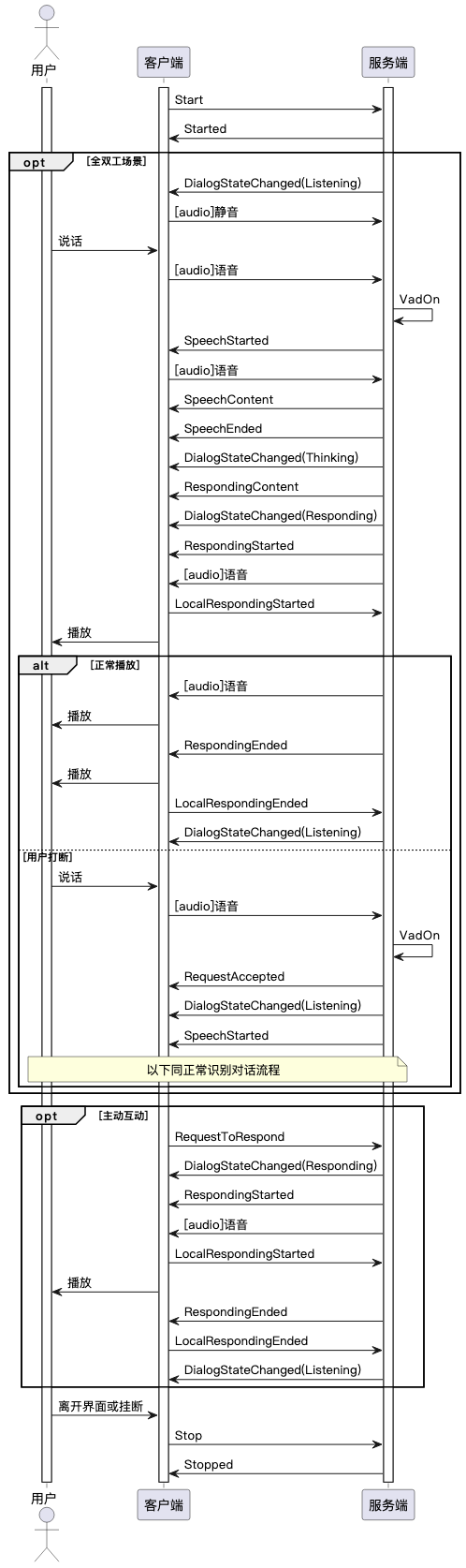
## **调用时序图**
|
||
|
||
**\[关键流程\]** 服务端返回`Started`消息表示会话创建成功,但客户端**禁止**立即发送音频。客户端必须等待并接收到`DialogStateChanged`事件且`state`为`Listening`后,方可开始发送音频流。
|
||
|
||
|
||
|
||
## **服务地址**
|
||
|
||
```
|
||
wss://dashscope.aliyuncs.com/api-ws/v1/inference
|
||
```
|
||
|
||
## **鉴权**
|
||
|
||
需要在发起初始的WebSocket握手(HTTP Upgrade)请求时,把API Key放在HTTP Header里(需要将your\_api\_key替换为真实的API Key):
|
||
|
||
```
|
||
"Authorization": "Bearer your_api_key"
|
||
```
|
||
|
||
## **语音交互**
|
||
|
||
多模态交互应用开启了**语音交互**后,支持语音识别和语音合成。
|
||
|
||
语音识别支持的模型包括:[Gummy实时语音识别](https://help.aliyun.com/zh/model-studio/real-time-speech-recognition-and-translation-api-reference/)(Gummy),[Paraformer实时语音识别](https://help.aliyun.com/zh/model-studio/paraformer-real-time-speech-recognition-api-reference/)(Paraformer),[FUN-ASR实时语音识别](https://help.aliyun.com/zh/model-studio/fun-asr-real-time-speech-recognition-api-reference/)(FunASR),[千问3-ASR-Flash-Realtime](https://help.aliyun.com/zh/model-studio/qwen-real-time-speech-recognition)(qwen3-asr-flash-realtime),多模态交互轻量版语音识别(AppSpecificASR-Realtime)。
|
||
|
||
语音合成支持的模型包括:[语音合成CosyVoice-v2大模型](https://help.aliyun.com/zh/model-studio/cosyvoice-large-model-for-speech-synthesis/)(cosyvoice-v2),[语音合成CosyVoice-v3-plus大模型](https://help.aliyun.com/zh/model-studio/text-to-speech)(cosyvoice-v3-plus),[语音合成CosyVoice-v3-Flash大模型](https://help.aliyun.com/zh/model-studio/text-to-speech)(cosyvoice-v3-flash),[Sambert语音合成](https://help.aliyun.com/zh/model-studio/sambert-speech-synthesis/)(sambert),[千问3-TTS](https://help.aliyun.com/zh/model-studio/qwen-tts-realtime)(qwen3-tts),多模态交互轻量版语音合成(AppSpecificTTS)。
|
||
|
||
语音合成支持的音色,可以在控制台上选择了模型后,点击右侧语音交互体验区域的右上角查看音色列表。
|
||
|
||
官方音色也可以参考官方文档:cosyvoice-v2 / cosyvoice-v3-plus / cosyvoice-v3-flash 支持的官方音色参考[音色列表](https://help.aliyun.com/zh/model-studio/cosyvoice-voice-list),qwen3-tts 支持的官方音色参考[支持的音色](https://help.aliyun.com/zh/model-studio/qwen-tts-realtime#422789c49bqqx),sambert支持的音色参考[模型列表](https://help.aliyun.com/zh/model-studio/sambert-java-sdk#74cedcb97el0b)(去掉开头的"sambert-"和末尾的"-v1"后就是voice的取值)。
|
||
|
||
使用复刻音色时,确认复刻音色状态为“OK”后才能使用。查询方法参考[查询指定音色](https://help.aliyun.com/zh/model-studio/cosyvoice-clone-api#34490e5a2by7z)。
|
||
|
||
## **消息类型**
|
||
|
||
### **二进制消息(Binary Message)**
|
||
|
||
当前二进制消息仅包含音频数据。
|
||
|
||
#### **上传音频**
|
||
|
||
上传音频时,将原始音频直接转为二进制流即可,无需额外处理。
|
||
|
||
上传的语音识别音频需满足:16bit(采样位深)、单声道、有符号、little-endian PCM编码,采样率参考[Start](#5b2363d40585y)消息的参数parameters.upstream.sample\_rate的取值说明。
|
||
|
||
如果希望减少网络流量和带宽占用,用户可以把PCM音频编码为Opus格式,同时设置上传音频格式为raw-opus。
|
||
|
||
上传音频时,根据[Start](#5b2363d40585y)消息中`upstream.mode`设置不同,采取的措施也不同:
|
||
|
||
- mode为 `tap2talk` 或 `duplex`:客户端需持续上传音频,服务端自动检测语音活动。建议每100ms上传一次数据,间隔太长或太短会对延时和处理效率造成负面影响。
|
||
|
||
- 音频上传速率计算公式:`数据每次上传的字节数 = 采样率 * 采样位深/8 * 时间间隔(ms)/ 1000`
|
||
|
||
- 以16kHz采样率、16bit位深、100ms间隔为例,每次应上传 `16000 * (16/8) * 100 / 1000 = 3200` 字节的PCM数据。
|
||
|
||
- mode为 `push2talk`:客户端无需持续上传音频,但需通过[SendSpeech](#cec23c1556u8x)和[StopSpeech](#d11933e7b5jz0)通知服务端音频识别的开始和结束。发送[SendSpeech](#cec23c1556u8x)后需立即上传音频,否则会增加处理时间。
|
||
|
||
|
||
#### **下发音频**
|
||
|
||
服务端将大模型回复发送至TTS生成语音然后下发给客户端:
|
||
|
||
- 下发音频为16bit单声道,采样率和编码由[Start](#5b2363d40585y)消息参数定义。
|
||
|
||
- 下发速度取决于TTS服务性能,通常快于播放速度。
|
||
|
||
- 音频下发前发送[RespondingStarted](#0693e9d4a5f91)事件;结束后发送[RespondingEnded](#402cbee340r1m)事件。
|
||
|
||
- 客户端需在播放完成后上报[LocalRespondingEnded](#f4b1a6bf22ymq),通知服务端播放结束。
|
||
|
||
|
||
### **文本消息(Text Message)**
|
||
|
||
文本消息是JSON格式字符串,按传递方向分为两类:
|
||
|
||
- **输入消息(Input Message)**:客户端发送给服务端的指令(directive),表示客户端希望服务端执行特定动作。
|
||
|
||
- **输出消息(Output Message)**:服务端发送给客户端的事件(event),表示服务端动作执行结果或进展。
|
||
|
||
|
||
文本消息标记交互流程的关键节点,控制流程并传输关键信息。通过[时序图](#6d25d6f8ddbtd)可了解不同消息的交互时序。
|
||
|
||
文本消息包含两部分:`header`和`payload`。
|
||
|
||
- `payload`:内容随[消息类型](#408ddb268eyt7)变化。
|
||
|
||
- `header`:内容固定,包含以下参数:
|
||
|
||
| **参数** | **类型** | **是否必选** | **说明** |
|
||
| --- | --- | --- | --- |
|
||
| task\_id | string | 是 | 本次连接唯一标识,用于在工程链路上跟踪任务执行。由客户端生成,格式建议为36位uuid字符串,格式示例:"f894c16f-f20e-4c1d-837e-89e0fbc63a43" |
|
||
| streaming | string | 是 | 输入输出类型,对于多模态交互必须为 "duplex" ,表示流式输入,流式输出 |
|
||
| action | string | 是 | 模型输入消息类型: - run-task: 任务的第一个输入消息 - finish-task: 任务的最后一个输入消息 - continue-task: 任务中其他输入消息 |
|
||
|
||
|
||
## **连接保活策略**
|
||
|
||
百炼平台规定,如果在**任意连续的60秒内**服务端没有向客户端发送任何消息,则认为调用发生错误,WebSocket连接将被服务端主动断开并返回`ResponseTimeout`错误。
|
||
|
||
若客户端需在无交互时保持连接,应定期发送心跳消息(HeartBeat)。服务端会回应心跳,确保连接活跃,避免超时关闭。
|
||
|
||
移动端和C++ SDK已内置心跳保活逻辑,用户无需手动发送。
|
||
|
||
## **文本消息类型**
|
||
|
||
### **开始会话**
|
||
|
||
#### **Start - Input Message**
|
||
|
||
请求开始会话消息。服务收到Start消息后,向客户端发送**Started**消息。
|
||
|
||
| **一级参数** | **二级参数** | **类型** | **是否必选** | **说明** |
|
||
| --- | --- | --- | --- | --- |
|
||
| task\_group | | string | 是 | 任务组名称,固定为"aigc",请直接复制使用 |
|
||
| task | | string | 是 | 任务名称,固定为"multimodal-generation",请直接复制使用 |
|
||
| function | | string | 是 | 调用功能,固定为"generation",请直接复制使用 |
|
||
| model | | string | 是 | 阿里云百炼模型名称,固定为"multimodal-dialog",请直接复制使用 |
|
||
| input | directive | string | 是 | 指令名称:Start |
|
||
| input | workspace\_id | string | 是 | 客户在阿里云百炼业务空间ID([Workspace ID](https://help.aliyun.com/zh/model-studio/obtain-the-app-id-and-workspace-id#732535cfc959h)),可在**多模态交互开发套件控制**台,点击左下角业务空间名称,“业务空间详情”中查看,目前仅支持主账号默认工作空间。 |
|
||
| input | app\_id | string | 是 | 客户创建的应用ID([APP ID](https://help.aliyun.com/zh/model-studio/obtain-the-app-id-and-workspace-id#2612f896detsz)),可在**多模态交互开发套件**控制台的“我的应用”页面查看 |
|
||
| input | dialog\_id | string | 否 | 对话ID,默认不填时是开启新会话,服务端会自动生成并在事件中下发,格式示例:"12345678-1234-1234-1234-1234567890ab",共36个字符。当希望继续之前的对话时,把当时服务端下发的dialog\_id在这里传入 |
|
||
| parameters | upstream | object | 是 | 参数说明参考下方 [parameters.upstream的参数说明](#c70ad23b46rng)表格 |
|
||
| parameters | downstream | object | 否 | 参数说明参考下方 [parameters.downstream的参数说明](#18bc9ff97bxur)表格 |
|
||
| parameters | client\_info | object | 是 | 参数说明参考下方 [parameters.client\_info的参数说明](#51228f3bc17yk)表格 |
|
||
| parameters | biz\_params | object | 否 | 参数说明参考下方 [parameters.biz\_params的参数说明](#eb89a03bfdk00)表格 |
|
||
|
||
**parameters.upstream**的参数说明如下**:**
|
||
|
||
| **一级参数** | **类型** | **是否必选** | **说明** |
|
||
| --- | --- | --- | --- |
|
||
| type | string | 是 | 上行类型: AudioOnly 仅语音通话 |
|
||
| mode | string | 否 | 客户端使用的模式,默认**tap2talk。** 可选项: - push2talk: 客户端控制模式。 - tap2talk: 点击模式。 - duplex: 双工模式。 三种模式的对比可以参考下方的[客户端使用的三种模式对比](#5e82453407pum)表格。 |
|
||
| audio\_format | string | 否 | 音频格式,支持pcm,raw-opus,默认为pcm |
|
||
| sample\_rate | int | 否 | 语音识别的采样率,支持范围: - 8000 - 16000 - 24000 - 48000 默认为16000 |
|
||
| vocabulary\_id | string | 否 | 热词id,设置该参数时会覆盖管控台热词配置。当管控台提供的热词不能满足客户需求时,可以考虑用Open API程序化管理热词,参见[热词API文档](https://next.api.aliyun.com/document/MultimodalDialog/2025-09-03/Vocabulary) |
|
||
|
||
**parameters.downstream**的参数说明如下:
|
||
|
||
| **一级参数** | **类型** | **是否必选** | **说明** |
|
||
| --- | --- | --- | --- |
|
||
| voice | string | 否 | 合成语音的音色,支持范围取决于用户在管控台选择的语音合成模型 |
|
||
| sample\_rate | int | 否 | 合成语音的采样率,支持范围: - 8000 - 16000 - 24000 - 48000 默认为24000。 千问-TTS、千问3-TTS模型仅支持24000。 |
|
||
| audio\_format | string | 否 | 音频格式,支持pcm,opus,mp3,raw-opus,默认为pcm。 千问-TTS模型仅支持pcm。 注意:opus 和 raw-opus的区别是opus格式的每一包数据都有额外ogg封装([RFC 7845](https://www.rfc-editor.org/rfc/rfc7845.html)) |
|
||
| frame\_size | int | 否 | 合成音频的帧大小,取值范围: - 10 - 20 - 40 - 60 - 100 - 120 默认值为60,单位ms 只在合成音频格式为opus或raw-opus时生效 |
|
||
| volume | int | 否 | 合成音频的音量,取值范围0-100,默认50 |
|
||
| speech\_rate | int | 否 | 合成音频的语速,取值范围50-200,表示默认语速的50%-200%,默认100 |
|
||
| pitch\_rate | int | 否 | 合成音频的声调,取值范围50-200,默认100 |
|
||
| bit\_rate | int | 否 | 合成音频的比特率,取值范围:6~510kbps,默认值为32,单位kbps,只在合成音频格式为opus或raw-opus时生效 |
|
||
| intermediate\_text | string | 否 | 控制返回给用户哪些中间文本: - transcript:返回用户语音识别结果 - dialog:返回对话系统回答中间结果 可以设置多种,以逗号分隔,默认为transcript |
|
||
| transmit\_rate\_limit | int | 否 | 下发音频发送速率限制,单位:字节每秒 |
|
||
| incremental\_response | boolean | 否 | 是否增量返回大模型结果,true为增量,false为全量。默认为false,全量下发 |
|
||
|
||
**parameters.client\_info**的参数说明如下:
|
||
|
||
| **一级参数** | **二级参数** | **类型** | **是否必选** | **说明** |
|
||
| --- | --- | --- | --- | --- |
|
||
| user\_id | | string | 是 | 终端用户ID,客户根据自己业务规则生成,用来针对不同终端用户实现定制化功能。最大长度36个字符。 |
|
||
| device.uuid | uuid | string | 否 | 客户端全局唯一的ID,需要用户自己生成并传入SDK,最大长度40个字符。一个终端用户可以有多个设备,那么每一个设备的uuid都不同,但user\_id相同。 |
|
||
| network | ip | string | 否 | 调用方公网IP |
|
||
| location | latitude | string | 否 | 调用方纬度信息,在需要客户端精确位置的业务场景提交 |
|
||
| location | longitude | string | 否 | 调用方经度信息,在需要客户端精确位置的业务场景提交 |
|
||
| location | city\_name | string | 否 | 调用方所在城市,指明客户端粗略位置 |
|
||
|
||
**parameters.biz\_params**的参数说明如下:
|
||
|
||
| **一级参数** | **类型** | **是否必选** | **说明** |
|
||
| --- | --- | --- | --- |
|
||
| user\_defined\_params | json object | 否 | 需要透传给agent的参数,各类agent传递的参数参考[调用官方Agent](https://help.aliyun.com/zh/model-studio/official-agent)文档说明 |
|
||
| user\_prompt\_params | json object | 否 | 用于设置用户自定义prompt变量,由用户自定义设置json中的key和value。管控台上配置自定义prompt变量的方法参考[应用配置-提示词](https://help.aliyun.com/zh/model-studio/multimodal-app-configuration#74a8b82973u0r) |
|
||
| user\_query\_params | json object | 否 | 用于设置用户自定义对话变量,由用户自定义设置json中的key和value。管控台上配置自定义对话变量的方法参考[应用配置-对话变量](https://help.aliyun.com/zh/model-studio/multimodal-app-configuration#62d90ef075ve1) |
|
||
|
||
##### **客户端使用的三种模式对比:**
|
||
|
||
| **对比项** | **push2talk** | **tap2talk** | **duplex** |
|
||
| --- | --- | --- | --- |
|
||
| 类型 | 客户端控制模式 | 点击模式 | 双工模式 |
|
||
| 音频上传方式 | 按需 | 持续 Listening状态超过20秒不上传音频即报错 | 持续 任何状态超过20秒不上传音频都报错 |
|
||
| VAD检测方 | 客户端 | 服务端 | 服务端 |
|
||
| 打断方式 | [RequestToSpeak](#8f987c58ddg2i)消息打断 | [RequestToSpeak](#8f987c58ddg2i)消息打断 | 语音打断 |
|
||
| 使用场景 | 由用户控制开始/结束客户端语音发送和识别,适用于按键说话,松开停止说话的场景。 | 客户端需持续上传音频,服务端自动检测语音活动的场景。但不支持用户语音打断大模型输出,只能发送RequestToSpeak打断消息。 | 客户端需持续上传音频,服务端自动检测语音活动的场景。用户随时可以说话打断大模型输出。 |
|
||
|
||
示例如下:
|
||
|
||
```
|
||
{
|
||
"header": {
|
||
"action":"run-task",
|
||
"task_id": "f894c16f-f20e-4c1d-837e-89e0fbc63a43",
|
||
"streaming":"duplex"
|
||
},
|
||
"payload": {
|
||
"task_group":"aigc",
|
||
"task":"multimodal-generation", // 任务类型:多模态生成
|
||
"function":"generation",
|
||
"model":"multimodal-dialog", // 模型名称:多模态对话(注意与task不同)
|
||
"input":{
|
||
"directive": "Start",
|
||
"workspace_id": "llm-***********",
|
||
"app_id": "****************"
|
||
},
|
||
"parameters":{
|
||
"upstream":{
|
||
"type": "AudioOnly",
|
||
"mode": "duplex"
|
||
},
|
||
"downstream":{
|
||
"voice": "longxiaochun_v2",
|
||
"sample_rate": 24000
|
||
},
|
||
"client_info":{
|
||
"user_id": "bin********207",
|
||
"device":{
|
||
"uuid": "432k*********k449"
|
||
},
|
||
"network":{
|
||
"ip": "203.0.113.10"
|
||
},
|
||
"location":{
|
||
"city_name": "北京市"
|
||
}
|
||
},
|
||
"biz_params":{
|
||
"user_defined_params": {
|
||
"agent_id_xxxxx": {
|
||
"name": "value"
|
||
}
|
||
},
|
||
"user_prompt_params": {
|
||
"name": "value"
|
||
},
|
||
"user_query_params": {
|
||
"name": "value"
|
||
}
|
||
}
|
||
}
|
||
}
|
||
}
|
||
```
|
||
|
||
#### **Started - Output Message**
|
||
|
||
**说明**
|
||
|
||
SDK接收到**Started**之后,先不可以向服务发送音频,应等待**DialogStateChanged**消息,确认切换到Listening状态之后才发送音频。
|
||
|
||
| **一级参数** | **二级参数** | **类型** | **说明** |
|
||
| --- | --- | --- | --- |
|
||
| output | event | string | 事件名称:Started |
|
||
| | dialog\_id | string | 对话ID |
|
||
|
||
示例如下:
|
||
|
||
Started返回消息样例
|
||
|
||
```
|
||
{
|
||
"header": {
|
||
"event":"result-generated",
|
||
"task_id": "f894c16f-f20e-4c1d-837e-89e0fbc63a43"
|
||
},
|
||
"payload": {
|
||
"output":{
|
||
"event": "Started",
|
||
"dialog_id": "dd84xxxx-xxxx-xxxx-xxxx-xxxxb7bb"
|
||
}
|
||
}
|
||
}
|
||
```
|
||
|
||
### **结束会话**
|
||
|
||
#### **Stop - Input Message**
|
||
|
||
| **一级参数** | **二级参数** | **类型** | **是否必选** | **说明** |
|
||
| --- | --- | --- | --- | --- |
|
||
| input | directive | string | 是 | 指令名称:Stop |
|
||
| | dialog\_id | string | 否 | 对话ID |
|
||
|
||
示例如下:
|
||
|
||
Stop请求样例
|
||
|
||
```
|
||
{
|
||
"header": {
|
||
"action":"finish-task",
|
||
"task_id": "f894c16f-f20e-4c1d-837e-89e0fbc63a43",
|
||
"streaming":"duplex"
|
||
},
|
||
"payload": {
|
||
"input":{
|
||
"directive": "Stop",
|
||
"dialog_id": "dd84xxxx-xxxx-xxxx-xxxx-xxxxb7bb"
|
||
}
|
||
}
|
||
}
|
||
```
|
||
|
||
#### **Stopped - Output Message**
|
||
|
||
| **一级参数** | **二级参数** | **类型** | **是否必选** | **说明** |
|
||
| --- | --- | --- | --- | --- |
|
||
| output | event | string | 是 | 事件名称:Stopped |
|
||
| | dialog\_id | string | 是 | 对话ID |
|
||
|
||
示例如下:
|
||
|
||
```
|
||
{
|
||
"header": {
|
||
"event":"result-generated",
|
||
"task_id": "f894c16f-f20e-4c1d-837e-89e0fbc63a43"
|
||
},
|
||
"payload": {
|
||
"output":{
|
||
"event": "Stopped",
|
||
"dialog_id": "dd84xxxx-xxxx-xxxx-xxxx-xxxxb7bb"
|
||
}
|
||
}
|
||
}
|
||
```
|
||
|
||
### **服务端下发状态切换事件**
|
||
|
||
#### **DialogStateChanged - Output Message**
|
||
|
||
| **一级参数** | **二级参数** | **类型** | **是否必选** | **说明** |
|
||
| --- | --- | --- | --- | --- |
|
||
| output | event | string | 是 | 事件名称:DialogStateChanged |
|
||
| | state | string | 是 | AI交互状态,取值范围:Listening,Thinking, Responding 注意:其中状态Listening 只是表示SDK可以发语音给服务端,不代表客户端是否开麦 |
|
||
| | dialog\_id | string | 是 | 对话ID |
|
||
|
||
示例如下:
|
||
|
||
```
|
||
{
|
||
"header": {
|
||
"event":"result-generated",
|
||
"task_id": "f894c16f-f20e-4c1d-837e-89e0fbc63a43"
|
||
},
|
||
"payload": {
|
||
"output":{
|
||
"event": "DialogStateChanged",
|
||
"state": "Listening",
|
||
"dialog_id": "dd84xxxx-xxxx-xxxx-xxxx-xxxxb7bb"
|
||
}
|
||
}
|
||
}
|
||
```
|
||
|
||
### **请求上传语音**
|
||
|
||
#### **RequestToSpeak - Input Message**
|
||
|
||
当前状态不是Listening,而用户又想说话时,先提交此事件打断大模型的回答,等待服务端应答。
|
||
|
||
具体触发此事件的用户行为根据交互类型有所不同,比如用户按下按钮、语音打断(依赖双工模块)等。
|
||
|
||
| **一级参数** | **二级参数** | **类型** | **是否必选** | **说明** |
|
||
| --- | --- | --- | --- | --- |
|
||
| input | directive | string | 是 | 指令名称:RequestToSpeak |
|
||
| | dialog\_id | string | 否 | 对话ID |
|
||
|
||
示例如下:
|
||
|
||
```
|
||
{
|
||
"header": {
|
||
"action":"continue-task",
|
||
"task_id": "f894c16f-f20e-4c1d-837e-89e0fbc63a43",
|
||
"streaming":"duplex"
|
||
},
|
||
"payload": {
|
||
"input":{
|
||
"directive": "RequestToSpeak",
|
||
"dialog_id": "dd84xxxx-xxxx-xxxx-xxxx-xxxxb7bb"
|
||
}
|
||
}
|
||
}
|
||
```
|
||
|
||
#### **RequestAccepted - Output Message 请求被准许**
|
||
|
||
| **一级参数** | **二级参数** | **类型** | **是否必选** | **说明** |
|
||
| --- | --- | --- | --- | --- |
|
||
| output | event | string | 是 | 事件名称:RequestAccepted |
|
||
| | dialog\_id | string | 是 | 对话ID |
|
||
|
||
示例如下:
|
||
|
||
```
|
||
{
|
||
"header": {
|
||
"event":"result-generated",
|
||
"task_id": "f894c16f-f20e-4c1d-837e-89e0fbc63a43"
|
||
},
|
||
"payload": {
|
||
"output":{
|
||
"event": "RequestAccepted",
|
||
"dialog_id": "dd84xxxx-xxxx-xxxx-xxxx-xxxxb7bb"
|
||
}
|
||
}
|
||
}
|
||
```
|
||
|
||
### **上传语音指令**
|
||
|
||
#### **SendSpeech - Input Message**
|
||
|
||
当Start消息指定模式为push2talk,需要客户端告知服务端用户何时开始说话。在Listening状态下,当用户按下按键时应上报SendSpeech消息,通知服务端即将开始上传语音,语音数据应紧接着此事件之后发送。
|
||
|
||
| **一级参数** | **二级参数** | **类型** | **是否必选** | **说明** |
|
||
| --- | --- | --- | --- | --- |
|
||
| input | directive | string | 是 | 指令名称:SendSpeech |
|
||
| | dialog\_id | string | 否 | 对话ID |
|
||
|
||
示例如下:
|
||
|
||
```
|
||
{
|
||
"header": {
|
||
"action":"continue-task",
|
||
"task_id": "f894c16f-f20e-4c1d-837e-89e0fbc63a43",
|
||
"streaming":"duplex"
|
||
},
|
||
"payload": {
|
||
"input":{
|
||
"directive": "SendSpeech",
|
||
"dialog_id": "dd84xxxx-xxxx-xxxx-xxxx-xxxxb7bb"
|
||
}
|
||
}
|
||
}
|
||
```
|
||
|
||
#### **StopSpeech - Input Message**
|
||
|
||
当Start消息指定模式为push2talk的时候,用户说完话松开按键时,客户端必须使用StopSpeech消息通知服务端结束语音指令输入。
|
||
|
||
| **一级参数** | **二级参数** | **类型** | **是否必选** | **说明** |
|
||
| --- | --- | --- | --- | --- |
|
||
| input | directive | string | 是 | 指令名称:StopSpeech |
|
||
| | dialog\_id | string | 否 | 对话ID |
|
||
|
||
示例如下:
|
||
|
||
```
|
||
{
|
||
"header": {
|
||
"action":"continue-task",
|
||
"task_id": "f894c16f-f20e-4c1d-837e-89e0fbc63a43",
|
||
"streaming":"duplex"
|
||
},
|
||
"payload": {
|
||
"input":{
|
||
"directive": "StopSpeech",
|
||
"dialog_id": "dd84xxxx-xxxx-xxxx-xxxx-xxxxb7bb"
|
||
}
|
||
}
|
||
}
|
||
```
|
||
|
||
#### **CancelSpeech - Input Message**
|
||
|
||
当Start消息指定模式为push2talk或tap2talk的时候,在语音输入过程中,用户可以使用CancelSpeech消息结束语音输入。服务会结束识别,回到空闲状态。
|
||
|
||
| **一级参数** | **二级参数** | **类型** | **是否必选** | **说明** |
|
||
| --- | --- | --- | --- | --- |
|
||
| input | directive | string | 是 | 指令名称:CancelSpeech |
|
||
| | dialog\_id | string | 否 | 对话ID |
|
||
|
||
示例如下:
|
||
|
||
```
|
||
{
|
||
"header": {
|
||
"action":"continue-task",
|
||
"task_id": "f894c16f-f20e-4c1d-837e-89e0fbc63a43",
|
||
"streaming":"duplex"
|
||
},
|
||
"payload": {
|
||
"input":{
|
||
"directive": "CancelSpeech",
|
||
"dialog_id": "dd84xxxx-xxxx-xxxx-xxxx-xxxxb7bb"
|
||
}
|
||
}
|
||
}
|
||
```
|
||
|
||
### **语音识别开始/结束**
|
||
|
||
#### **SpeechStarted - Output Message**
|
||
|
||
当服务端检测到asr语音起点时下发此事件。
|
||
|
||
| **一级参数** | **二级参数** | **类型** | **是否必选** | **说明** |
|
||
| --- | --- | --- | --- | --- |
|
||
| output | event | string | 是 | 事件名称:SpeechStarted |
|
||
| | dialog\_id | string | 是 | 对话ID |
|
||
|
||
示例如下:
|
||
|
||
```
|
||
{
|
||
"header": {
|
||
"event":"result-generated",
|
||
"task_id": "f894c16f-f20e-4c1d-837e-89e0fbc63a43"
|
||
},
|
||
"payload": {
|
||
"output":{
|
||
"event": "SpeechStarted",
|
||
"dialog_id": "dd84xxxx-xxxx-xxxx-xxxx-xxxxb7bb"
|
||
}
|
||
}
|
||
}
|
||
```
|
||
|
||
#### **SpeechEnded - Output Message**
|
||
|
||
当服务端检测到asr语音尾点时下发此事件,如果客户端还在上传音频,则收到此事件后应停止上传音频。
|
||
|
||
| **一级参数** | **二级参数** | **类型** | **是否必选** | **说明** |
|
||
| --- | --- | --- | --- | --- |
|
||
| output | event | string | 是 | 事件名称:SpeechEnded |
|
||
| | dialog\_id | string | 是 | 对话ID |
|
||
|
||
示例如下:
|
||
|
||
```
|
||
{
|
||
"header": {
|
||
"event":"result-generated",
|
||
"task_id": "f894c16f-f20e-4c1d-837e-89e0fbc63a43"
|
||
},
|
||
"payload": {
|
||
"output":{
|
||
"event": "SpeechEnded",
|
||
"dialog_id": "dd84xxxx-xxxx-xxxx-xxxx-xxxxb7bb"
|
||
}
|
||
}
|
||
}
|
||
```
|
||
|
||
### **指定应答内容**
|
||
|
||
#### **RequestToRespond - Input Message**
|
||
|
||
在Listening状态时,通知服务端与用户主动交互,服务端会根据type字段把在text字段中上传的文本直接转换为语音下发,或调用大模型,返回的结果再转换为语音下发。
|
||
|
||
| **一级参数** | **二级参数** | **类型** | **是否必选** | **说明** |
|
||
| --- | --- | --- | --- | --- |
|
||
| input | directive | string | 是 | 指令名称:RequestToRespond |
|
||
| input | dialog\_id | string | 是 | 对话ID |
|
||
| input | type | string | 是 | 服务应该采取的交互类型,目前支持两种: - transcript:表示直接把文本转语音 - prompt:表示把文本发送给大模型让其进行回答 |
|
||
| input | text | string | 是 | 要处理的文本,非null。 - 调用部分agent时,text可以是""空字符串,服务端只需要使用parameters中的images或者biz\_params参数即可处理。具体参考[调用官方Agent](https://help.aliyun.com/zh/model-studio/official-agent)。 |
|
||
| parameters | images | list\[\] | 否 | 需要分析的图片信息 |
|
||
| parameters | biz\_params | object | 否 | 参数说明参考下方 [parameters.biz\_params的参数说明](#b5975e73ab3s0)表格 |
|
||
|
||
**parameters.biz\_params**的参数说明如下:
|
||
|
||
| **一级参数** | **类型** | **是否必选** | **说明** |
|
||
| --- | --- | --- | --- |
|
||
| videos | list\[\] | 否 | 用来控制进入和退出视频通话。 示例如下: payload.biz\_params.videos.action为connect,表示进入视频模式。 payload.biz\_params.videos.action为exit,表示退出视频模式。 |
|
||
| 其他参数 | | 否 | 与[Start](#5b2363d40585y)消息中`parameters.biz_params`相同,传递对话系统自定义参数。RequestToRespond的`biz_params`参数只在本次请求中生效。 |
|
||
|
||
**说明**
|
||
|
||
除了videos参数外,`parameters.biz_params`与[Start](#5b2363d40585y)消息中的`parameters.biz_params`相同,传递对话系统自定义参数。RequestToRespond的`biz_params`参数只在本次请求中生效。
|
||
|
||
```
|
||
{
|
||
"header": {
|
||
"action":"continue-task",
|
||
"task_id": "f894c16f-f20e-4c1d-837e-89e0fbc63a43",
|
||
"streaming":"duplex"
|
||
},
|
||
"payload": {
|
||
"input":{
|
||
"directive": "RequestToRespond",
|
||
"dialog_id": "dd84xxxx-xxxx-xxxx-xxxx-xxxxb7bb",
|
||
"type": "prompt",
|
||
"text": "你好,你有什么想聊的呢"
|
||
},
|
||
"parameters":{
|
||
"images":[{
|
||
"type": "base64",
|
||
"value": "aGVsbG8gd29ybGQ="
|
||
}],
|
||
"biz_params":{
|
||
"user_defined_params":{},
|
||
"videos": [
|
||
{
|
||
"action": "connect/exit",
|
||
"type": "voicechat_video_channel"
|
||
}
|
||
]
|
||
}
|
||
}
|
||
}
|
||
}
|
||
```
|
||
|
||
### **AI语音应答状态**
|
||
|
||
#### **RespondingStarted - Output Message**
|
||
|
||
AI语音应答开始,sdk要准备接收服务端下发的语音数据
|
||
|
||
| **一级参数** | **二级参数** | **类型** | **是否必选** | **说明** |
|
||
| --- | --- | --- | --- | --- |
|
||
| output | event | string | 是 | 事件名称:RespondingStarted |
|
||
| | dialog\_id | string | 是 | 对话ID |
|
||
|
||
示例如下:
|
||
|
||
```
|
||
{
|
||
"header": {
|
||
"event":"result-generated",
|
||
"task_id": "f894c16f-f20e-4c1d-837e-89e0fbc63a43"
|
||
},
|
||
"payload": {
|
||
"output":{
|
||
"event": "RespondingStarted",
|
||
"dialog_id": "dd84xxxx-xxxx-xxxx-xxxx-xxxxb7bb"
|
||
}
|
||
}
|
||
}
|
||
```
|
||
|
||
#### **RespondingEnded - Output Message**
|
||
|
||
AI语音应答结束
|
||
|
||
| **一级参数** | **二级参数** | **类型** | **是否必选** | **说明** |
|
||
| --- | --- | --- | --- | --- |
|
||
| output | event | string | 是 | 事件名称:RespondingEnded |
|
||
| | dialog\_id | string | 是 | 对话ID |
|
||
|
||
示例如下:
|
||
|
||
```
|
||
{
|
||
"header": {
|
||
"event":"result-generated",
|
||
"task_id": "f894c16f-f20e-4c1d-837e-89e0fbc63a43"
|
||
},
|
||
"payload": {
|
||
"output":{
|
||
"event": "RespondingEnded",
|
||
"dialog_id": "dd84xxxx-xxxx-xxxx-xxxx-xxxxb7bb"
|
||
}
|
||
}
|
||
}
|
||
```
|
||
|
||
### 客户端**播放事件**
|
||
|
||
#### **LocalRespondingStarted - Input Message**
|
||
|
||
客户端开始播放服务端下发的音频
|
||
|
||
| **一级参数** | **二级参数** | **类型** | **是否必选** | **说明** |
|
||
| --- | --- | --- | --- | --- |
|
||
| input | directive | string | 是 | 指令名称:LocalRespondingStarted |
|
||
| | dialog\_id | string | 否 | 对话ID |
|
||
|
||
示例如下:
|
||
|
||
```
|
||
{
|
||
"header": {
|
||
"action":"continue-task",
|
||
"task_id": "f894c16f-f20e-4c1d-837e-89e0fbc63a43",
|
||
"streaming":"duplex"
|
||
},
|
||
"payload": {
|
||
"input":{
|
||
"directive": "LocalRespondingStarted",
|
||
"dialog_id": "dd84xxxx-xxxx-xxxx-xxxx-xxxxb7bb"
|
||
}
|
||
}
|
||
}
|
||
```
|
||
|
||
#### **LocalRespondingEnded - Input Message**
|
||
|
||
客户端播放服务端下发的音频完成,服务端根据此消息判断端侧语音播放结束,结束当前问答,重新切换到Listening状态。
|
||
|
||
| **一级参数** | **二级参数** | **类型** | **是否必选** | **说明** |
|
||
| --- | --- | --- | --- | --- |
|
||
| input | directive | string | 是 | 指令名称:LocalRespondingEnded |
|
||
| | dialog\_id | string | 否 | 对话ID |
|
||
|
||
示例如下:
|
||
|
||
```
|
||
{
|
||
"header": {
|
||
"action":"continue-task",
|
||
"task_id": "f894c16f-f20e-4c1d-837e-89e0fbc63a43",
|
||
"streaming":"duplex"
|
||
},
|
||
"payload": {
|
||
"input":{
|
||
"directive": "LocalRespondingEnded",
|
||
"dialog_id": "dd84xxxx-xxxx-xxxx-xxxx-xxxxb7bb"
|
||
}
|
||
}
|
||
}
|
||
```
|
||
|
||
### **文本下发事件**
|
||
|
||
#### **SpeechContent - Output Message**
|
||
|
||
| **一级参数** | **二级参数** | **类型** | **是否必选** | **说明** |
|
||
| --- | --- | --- | --- | --- |
|
||
| output | event | string | 是 | 事件名称:SpeechContent |
|
||
| | dialog\_id | string | 是 | 对话ID |
|
||
| | text | string | 是 | 用户语音识别出的文本,流式返回,每次返回从识别开始到当前的完整识别结果。例如,您会先收到`"text": "你好"`,接着收到`"text": "你好世界"`。 |
|
||
| | finished | bool | 是 | 输出是否结束 |
|
||
|
||
示例如下:
|
||
|
||
```
|
||
{
|
||
"header": {
|
||
"event":"result-generated",
|
||
"task_id": "f894c16f-f20e-4c1d-837e-89e0fbc63a43"
|
||
},
|
||
"payload": {
|
||
"output":{
|
||
"event": "SpeechContent",
|
||
"dialog_id": "dd84xxxx-xxxx-xxxx-xxxx-xxxxb7bb",
|
||
"text": "一二三",
|
||
"finished": false
|
||
}
|
||
}
|
||
}
|
||
```
|
||
|
||
#### **RespondingContent - Output Message**
|
||
|
||
| **一级参数** | **二级参数** | **类型** | **是否必选** | **说明** |
|
||
| --- | --- | --- | --- | --- |
|
||
| output | event | string | 是 | 事件名称:RespondingContent |
|
||
| | dialog\_id | string | 是 | 对话ID |
|
||
| | round\_id | string | 是 | 本轮交互的ID |
|
||
| | llm\_request\_id | string | 是 | 调用llm的request\_id |
|
||
| | text | string | 是 | 系统对外输出的文本,流式全量输出 |
|
||
| | spoken | string | 是 | 合成语音时使用的文本,流式全量输出 |
|
||
| | finished | bool | 是 | 输出是否结束 |
|
||
| | extra\_info | object | 否 | 其他扩展信息,目前支持: - commands: 命令字符串,**此字段为JSON字符串,需要进行二次解析。**各类agent使用的命令字符串可以参考[调用官方Agent](https://help.aliyun.com/zh/model-studio/official-agent)的说明。 - agent\_info: 智能体信息 - tool\_calls: 插件返回的信息 如果没有扩展信息要提交则省略此字段。 |
|
||
|
||
示例如下:
|
||
|
||
```
|
||
{
|
||
"header": {
|
||
"event": "result-generated",
|
||
"task_id": "f894c16f-f20e-4c1d-837e-89e0fbc63a43"
|
||
},
|
||
"payload": {
|
||
"output": {
|
||
"event": "RespondingContent",
|
||
"dialog_id": "dd84xxxx-xxxx-xxxx-xxxx-xxxxb7bb",
|
||
"text": "您输入了数字序列“12345”。如果您有关于这些数字的问题或者需要我用它们来完成某项任务,请告诉我更多的细节,我会尽力帮助您。",
|
||
"spoken": "您输入了数字序列“12345”。如果您有关于这些数字的问题或者需要我用它们来完成某项任务,请告诉我更多的细节,我会尽力帮助您。",
|
||
"finished": true,
|
||
"extra_info": {
|
||
"commands": "[{\"name\":\"VOLUME_SET\",\"params\":[{\"name\":\"series\",\"normValue\":\"70\",\"value\":\"70\"}]}]",
|
||
"tool_calls": [
|
||
{
|
||
"id": "",
|
||
"type": "function",
|
||
"function": {
|
||
"name": "function_name",
|
||
"arguments": "{\"id\": \"123\", \"name\": \"test\"}",
|
||
"outputs": "{\"result\": \"success\"}",
|
||
"status": {
|
||
"code": 200,
|
||
"message": "Success."
|
||
}
|
||
}
|
||
}
|
||
]
|
||
}
|
||
}
|
||
}
|
||
}
|
||
```
|
||
|
||
### 客户端**更新事件**
|
||
|
||
#### **UpdateInfo - Input Message**
|
||
|
||
| **一级参数** | **二级参数** | **三级参数** | **类型** | **是否必选** | **说明** |
|
||
| --- | --- | --- | --- | --- | --- |
|
||
| input | directive | | string | 是 | 指令名称:UpdateInfo |
|
||
| | dialog\_id | | string | 否 | 对话ID |
|
||
| parameters | images | | list\[\] | 否 | 图片数据 |
|
||
| | client\_info | status | object | 否 | 客户端当前状态 |
|
||
| | biz\_params | | object | 否 | 与Start消息中biz\_params相同,传递对话系统自定义参数。UpdateInfo指令中biz\_params下面每个子项会全量替换Start指令中biz\_params下面的同名项,并在本次连接后续所有对话中生效。 |
|
||
|
||
示例如下:
|
||
|
||
```
|
||
{
|
||
"header": {
|
||
"action":"continue-task",
|
||
"task_id": "f894c16f-f20e-4c1d-837e-89e0fbc63a43",
|
||
"streaming":"duplex"
|
||
},
|
||
"payload": {
|
||
"input":{
|
||
"directive": "UpdateInfo",
|
||
"dialog_id": "dd84xxxx-xxxx-xxxx-xxxx-xxxxb7bb"
|
||
},
|
||
"parameters":{
|
||
"images":[{
|
||
"type": "base64",
|
||
"value": "base64String"
|
||
}],
|
||
"client_info": {
|
||
"status": {
|
||
"bluetooth_announcement": {
|
||
"status": "stopped"
|
||
},
|
||
"stream_media_playback": {
|
||
"status": "stopped"
|
||
},
|
||
"phone_ringing": {
|
||
"status": "stopped"
|
||
},
|
||
"stream_media_playback_qq": {
|
||
"status": "stopped"
|
||
}
|
||
}
|
||
},
|
||
"biz_params":{
|
||
}
|
||
}
|
||
}
|
||
}
|
||
```
|
||
|
||
### **心跳事件**
|
||
|
||
可以通过定期向服务端发送此消息,避免连接超时断开。考虑到预留网络延迟和处理时间的buffer,建议发送频率50秒一次。服务端会回应相同消息,客户端收到不需要做任何处理,忽略即可。
|
||
|
||
#### **HeartBeat - Input Message**
|
||
|
||
| **一级参数** | **二级参数** | **类型** | **是否必选** | **说明** |
|
||
| --- | --- | --- | --- | --- |
|
||
| input | directive | string | 是 | 指令名称:**HeartBeat** |
|
||
| | dialog\_id | string | 否 | 对话id |
|
||
|
||
示例:
|
||
|
||
```
|
||
{
|
||
"header": {
|
||
"action": "continue-task",
|
||
"task_id": "f894c16f-f20e-4c1d-837e-89e0fbc63a43",
|
||
"streaming": "duplex"
|
||
},
|
||
"payload": {
|
||
"input": {
|
||
"directive": "HeartBeat",
|
||
"dialog_id": "dd84xxxx-xxxx-xxxx-xxxx-xxxxb7bb"
|
||
}
|
||
}
|
||
}
|
||
```
|
||
|
||
#### **HeartBeat - Output Message**
|
||
|
||
| **一级参数** | **二级参数** | **类型** | **是否必选** | **说明** |
|
||
| --- | --- | --- | --- | --- |
|
||
| output | event | string | 是 | 事件名称:**HeartBeat** |
|
||
| | dialog\_id | string | 是 | 对话id |
|
||
|
||
示例:
|
||
|
||
```
|
||
{
|
||
"header": {
|
||
"event":"result-generated",
|
||
"task_id": "f894c16f-f20e-4c1d-837e-89e0fbc63a43"
|
||
},
|
||
"payload": {
|
||
"output":{
|
||
"event": "HeartBeat",
|
||
"dialog_id": "dd84xxxx-xxxx-xxxx-xxxx-xxxxb7bb"
|
||
}
|
||
}
|
||
}
|
||
```
|
||
|
||
### **错误事件**
|
||
|
||
#### **Error - Output Message**
|
||
|
||
| **一级参数** | **二级参数** | **类型** | **是否必选** | **说明** |
|
||
| --- | --- | --- | --- | --- |
|
||
| output | error\_code | int | 是 | 错误码 |
|
||
| output | error\_name | string | 是 | 错误名称 |
|
||
| output | error\_message | string | 是 | 错误消息 |
|
||
|
||
```
|
||
{
|
||
"header": {
|
||
"event":"result-generated",
|
||
"task_id": "f894c16f-f20e-4c1d-837e-89e0fbc63a43"
|
||
},
|
||
"payload": {
|
||
"output":{
|
||
"event": "Error",
|
||
"dialog_id": "dd84xxxx-xxxx-xxxx-xxxx-xxxxb7bb",
|
||
"error_code": 500,
|
||
"error_name": "InternalLLMError",
|
||
"error_message": "Internal LLM error"
|
||
}
|
||
}
|
||
}
|
||
```
|
||
|
||
### **错误码**
|
||
|
||
如遇报错问题,请参见[多模态交互套件-错误码](https://help.aliyun.com/zh/model-studio/multimodal-error-code)进行排查。
|
||
|
||
若问题仍未解决,请联系技术支持,反馈遇到的问题,并提供完整的request\_id和dialog\_id,以便进一步排查问题。
|
||
|
||
## **术语说明**
|
||
|
||
**VAD**:Voice Activity Detection,语音活动检测。
|
||
|
||
**ASR**:Automatic Speech Recognition,自动语音识别。
|
||
|
||
**TTS**:Text-to-Speech,文本转语音,语音合成。
|
||
|
||
**LLM**:Large Language Model,大语言模型。
|
||
|
||
本文介绍使用阿里云百炼多模态交互套件可能出现的错误信息及解决方案。
|
||
|
||
## **AccessDenied.Unpurchased**
|
||
|
||
```
|
||
{"header":{"task_id":"xxxxx","event":"task-failed","error_code":"AccessDenied.Unpurchased","error_message":"Access to model denied. Please make sure you are eligible for using the model.","attributes":{}},"payload":{}}
|
||
```
|
||
|
||
### **Access to model denied. Please make sure you are eligible for using the model.**
|
||
|
||
**原因:**错误码error\_code出现在header里,用户未开通阿里云百炼服务,无法建连。
|
||
|
||
**解决方案:**注册或登录阿里云账号,然后前往模型广场开通百炼服务。
|
||
|
||
## **Model.AccessDenied**
|
||
|
||
```
|
||
{"header":{"task_id":"xxxxx","event":"task-failed","error_code":"Model.AccessDenied","error_message":"Model access denied.","attributes":{}},"payload":{}}
|
||
```
|
||
|
||
### **Model access denied.**
|
||
|
||
**原因:** 错误码error\_code出现在header里,使用的业务空间不是默认业务空间,无法建连。目前多模态交互只支持从默认业务空间调用。
|
||
|
||
**解决方案:**使用默认业务空间的API Key调用多模态交互。
|
||
|
||
## **RequestTimeOut**
|
||
|
||
```
|
||
{"header":{"task_id":"xxxxx","event":"task-failed","error_code":"ResponseTimeout","error_message":"Response timeout!","attributes":{}},"payload":{}}
|
||
```
|
||
|
||
### **Response timeout!**
|
||
|
||
**原因:** 错误码error\_code出现在header里,百炼网关报错,无法建连。百炼网关要求服务端和客户端必须持续通信,如果超过1分钟没有交互则会超时报错。
|
||
|
||
**解决方案:** 持续交互,避免长时间无消息传递。若客户端需在无交互时保持连接,应定期发送心跳消息(HeartBeat)。服务端会回应心跳,确保连接活跃,避免超时关闭。具体的心跳消息格式参见[心跳事件](https://help.aliyun.com/zh/model-studio/multimodal-interaction-protocol#df274da95fsoq)。
|
||
|
||
## **421-**InvalidParameter
|
||
|
||
```
|
||
{"header":{"event":"result-generated","task_id":"xxxxx","status_code":421,"status_name":"InvalidParameter","status_message":"xxxxx"},"payload":{"output":{"event":"Error","dialog_id":"xxxxx"}}}
|
||
```
|
||
|
||
### **type of directive payload is error, please choose transcript or prompt**
|
||
|
||
**原因:**错误码status\_code出现在header里,收到该错误后连接会断开,是RequestToRespond的参数type取值错误。
|
||
|
||
**解决方案:**修正RequestToRespond的参数type,重新发请求。type只能支持以下两种:
|
||
|
||
(1)transcript 表示直接把文本转语音。
|
||
|
||
(2)prompt 表示把文本送大模型回答。
|
||
|
||
### **status\_message是其他报错信息**
|
||
|
||
**原因:**status\_code出现在header里,收到该错误后连接会断开,是其他的参数取值错误 ,status\_message 信息都有具体的提示说明。
|
||
|
||
**解决方案:**根据 status\_message 信息提示修正参数取值。
|
||
|
||
## **422-**DirectiveNotSupported
|
||
|
||
```
|
||
{"header":{"event":"result-generated","task_id":"xxxxx","status_code":422,"status_name":"DirectiveNotSupported","status_message":"Directive not supported: xxx"},"payload":{"output":{"event":"Error","dialog_id":"xxxxx"}}}
|
||
```
|
||
|
||
### Directive not supported: xxx
|
||
|
||
**原因:**错误码status\_code出现在header里,收到该错误后连接会断开。传入的指令 directive 的取值是不支持的指令。
|
||
|
||
**解决方案:**请检查指令名称,使用多模态交互可用的指令。参考[文本消息类型](https://help.aliyun.com/zh/model-studio/multimodal-interaction-protocol#15c38d92bc50s)的说明。
|
||
|
||
## **432-**AppConfigError
|
||
|
||
```
|
||
{"header":{"event":"result-generated","task_id":"xxxxx","status_code":432,"status_name":"AppConfigError","status_message":"xxxxxxx"},"payload":{"output":{"event":"Error","dialog_id":"xxxxx"}}}
|
||
```
|
||
|
||
**原因:**错误码status\_code出现在header里,收到该错误后连接会断开。获取到百炼应用的配置时出现问题。
|
||
|
||
**解决方案:**参考status\_message 里的具体信息,修改传入的参数配置。
|
||
|
||
## **433-**BillingAuthError
|
||
|
||
```
|
||
{"header":{"event":"result-generated","task_id":"xxxxx","status_code":433,"status_name":"BillingAuthError","status_message":"xxxxxxx"},"payload":{"output":{"event":"Error","dialog_id":"xxxxx"}}}
|
||
```
|
||
|
||
### Billing auth info not found!
|
||
|
||
**原因:**错误码status\_code出现在header里,收到该错误后连接会断开。当前使用的账号未开通百炼多模态交互服务。
|
||
|
||
**解决方案:**为当前账号开通百炼多模态交互服务,或使用已开通的账号。
|
||
|
||
## **444-**ClientAudioTimeout
|
||
|
||
```
|
||
{"header":{"event":"result-generated","task_id":"xxxxx","status_code":444,"status_name":"ClientAudioTimeout","status_message":"Waiting for client audio timed out."},"payload":{"output":{"event":"Error","dialog_id":"xxxxx"}}}
|
||
```
|
||
|
||
### Waiting for client audio timed out.
|
||
|
||
**原因:**错误码status\_code出现在header里,收到该错误后连接会断开。服务端长时间收不到客户端的音频输入。
|
||
|
||
**解决方案:**在duplex模式应持续向服务端上传音频;在tap2talk模式应保证在状态切换到Listening之后立刻持续上传音频,也可以在所有状态下都上传音频;在push2talk模式发送SendSpeech消息后应立刻上传音频直到发送StopSpeech消息。
|
||
|
||
## **449-**TooManyInterrupt
|
||
|
||
```
|
||
{"header":{"event":"result-generated","task_id":"xxxxx","status_code":449,"status_name":"TooManyInterrupt","status_message":"Send too many RequestToRespond or RequestToSpeak directives in a short time!"},"payload":{"output":{"event":"Error","dialog_id":"xxxxx"}}}
|
||
```
|
||
|
||
### Send too many RequestToRespond or RequestToSpeak directives in a short time!
|
||
|
||
**原因:**错误码status\_code出现在header里,收到该错误后连接会断开。用户短时间内发送过多RequestToRespond或RequestToSpeek 打断正常交互,通常是调用程序bug导致。
|
||
|
||
**解决方案:**排查程序调用逻辑,避免多次发送RequestToRespond或RequestToSpeek 。
|
||
|
||
## **424-**AudioFormatError
|
||
|
||
```
|
||
{"header":{"event":"result-generated","task_id":"xxxxx","status_code":424,"status_name":"AudioFormatError","status_message":"xxxxx"},"payload":{"output":{"event":"Error","dialog_id":"xxxxx"}}}
|
||
```
|
||
|
||
### Failed to decode audio! Please check audio format! / ASR decode error, please check audio format!
|
||
|
||
**原因:**错误码status\_code出现在header里,收到该错误后连接会断开。输入音频的格式不合规,ASR无法正常解析音频。
|
||
|
||
**解决方案:**检查输入的音频格式,输入正确的音频数据。
|
||
|
||
## **425-**NoInputAudioError
|
||
|
||
```
|
||
{"header":{"event":"result-generated","task_id":"xxxxx","status_code":200,"status_name":"Success","status_message":"Success"},"payload":{"output":{"event":"Error","dialog_id":"xxxxx","round_id":"xxxxx","llm_request_id":"xxxxx","error_code":425,"error_name":"NoInputAudioError","error_message":"ASR input audio error, no input audio , please check audio data!"}}}
|
||
```
|
||
|
||
### ASR input audio error, no input audio , please check audio data!
|
||
|
||
**原因:**错误码error\_code出现在payload里,收到该错误后连接不会断开。没有获取到有效的输入音频数据,ASR无法识别。
|
||
|
||
**解决方案:**检查是否有音频数据发送,重新输入正确的音频数据。
|
||
|
||
## **426-**InvalidTtsVoice
|
||
|
||
```
|
||
{"header":{"event":"result-generated","task_id":"xxxxx","status_code":200,"status_name":"Success","status_message":"Success"},"payload":{"output":{"event":"Error","dialog_id":"xxxxx","round_id":"xxxxx","llm_request_id":"xxxxx","error_code":426,"error_name":"InvalidTtsVoice","error_message":"tts voice error , need xxx voice."}}}
|
||
```
|
||
|
||
### tts voice error , need xxx voice.
|
||
|
||
**原因:**错误码error\_code出现在payload里,收到该错误后连接不会断开。音色参数 voice 取值错误,选择的音色不是当前的语音合成模型支持的音色。
|
||
|
||
**解决方案:**将voice修正为正确的音色。
|
||
|
||
(1)官方音色:
|
||
|
||
- 参考官方文档:cosyvoice-v2 / cosyvoice-v3 / cosyvoice-v3-plus / cosyvoice-v3-flash 支持的官方音色参考[音色列表](https://help.aliyun.com/zh/model-studio/cosyvoice-voice-list),qwen-tts-realtime / qwen3-tts 支持的官方音色参考[支持的音色](https://help.aliyun.com/zh/model-studio/qwen-tts-realtime#422789c49bqqx),sambert支持的音色参考[模型列表](https://help.aliyun.com/zh/model-studio/sambert-java-sdk#74cedcb97el0b)(去掉开头的"sambert-"和末尾的"-v1"后就是voice的取值)。
|
||
|
||
- 其他语音合成模型的音色都可以在多模态交互控制台上查看:在左侧**语音交互**配置区域选择对应的语音合成模型,点击右侧**语音交互体验**区域的右上角即可查看可用的音色列表。
|
||
|
||
|
||
(2)复刻音色,确认音色状态为“OK”后才能使用。查询方法参考[查询指定音色](https://help.aliyun.com/zh/model-studio/cosyvoice-clone-api#34490e5a2by7z)。
|
||
|
||
## **451-**NoSpeechRecognized
|
||
|
||
```
|
||
{"header":{"event":"result-generated","task_id":"xxxxx","status_code":200,"status_name":"Success","status_message":"Success"},"payload":{"output":{"event":"Error","dialog_id":"xxxxx","round_id":"xxxxx","llm_request_id":"xxxxx","error_code":451,"error_name":"NoSpeechRecognized","error_message":"No speech recognized from audio!"}}}
|
||
```
|
||
|
||
### No speech recognized from audio!
|
||
|
||
**原因:**错误码error\_code出现在payload里,收到该错误后连接不会断开。服务没有识别到用户讲话,通常是push2talk模式下,用户发送了SendSpeech后,没有说话就又发送了StopSpeech指令。其他模式下也有极少数情况是由背景噪音引起。
|
||
|
||
**解决方案:**检查消息发送的逻辑,确认是否有用户说话的音频数据发送到服务端。
|
||
|
||
## **500-InternalSynthesizerError/InternalAsrError /InternalLLMError/LLMTimeoutError**
|
||
|
||
```
|
||
{"header":{"event":"result-generated","task_id":"xxxxx","status_code":200,"status_name":"Success","status_message":"Success"},"payload":{"output":{"event":"Error","dialog_id":"xxxxx","round_id":"xxxxx","llm_request_id":"xxxxx","error_code":500,"error_name":"InternalAsrError","error_message":"Internal asr error"}}}
|
||
```
|
||
|
||
### Internal synthesizer error/Internal asr error/Internal LLM error/LLM response timeout
|
||
|
||
**原因:**错误码error\_code出现在payload里,收到此类错误后连接不会断开。服务内部错误,tts/asr/llm出错。
|
||
|
||
**解决方案:**出现此类错误时,可以重新发起请求来恢复使用。如果需要确认具体原因,请记录出错时完整的request\_id和dialog\_id,联系技术支持。 |